Turn this launch plan into the three assumptions most likely to fail.
Captured from ChatGPTThe scratchpad between AI answers
macOS 14+Keep the thought.Continue the work.
Capture the useful answer, screenshot, link, or next prompt the moment it appears—or press Option–Return for a fast answer from your chosen model route without leaving the panel.
Limited launch offer$19 once$29 soon ↘Permanent Mac licenseEncrypted on your MacNo account in the appWorks across AI tools
Signed and notarized for macOSVersion 0.1.6 · Universal app · 14-day trial
Launch2 notesACTIVE
Write the smallest experiment that would change the pricing decision.
Captured from CursorResearch1 note
Lead with the cross-tool workflow, not another feature list.
Captured from Claude02 double-tap Shift
One shortcut away from
ChatGPT·Claude·Cursor·Codex·Terminal·Safari
The real native app
A quiet place for the work between answers.
Capture without rearranging your desk. Keep the active project selected, save screenshots and files beside the notes, and copy the next move back when the current answer is done.
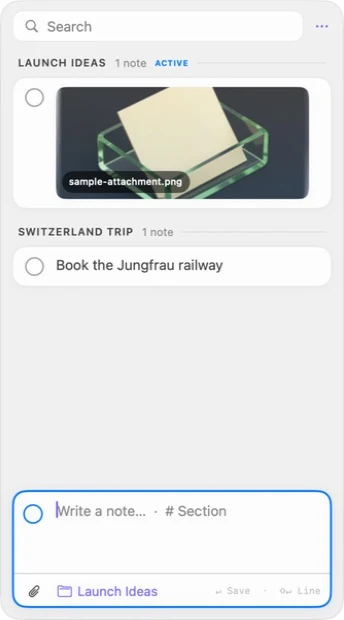
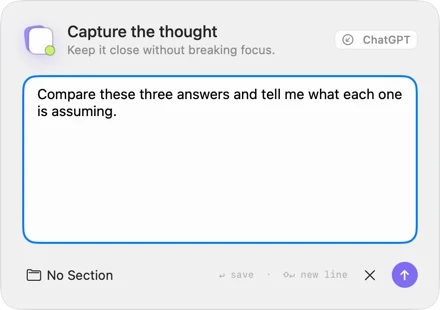
Actual CueStash interface · macOS fixture data · no concept render
A question in.
An answer back.
Open Quick Capture, type or paste what you need, and press Option–Return. The response stays concise, appears in the same panel, and lives in a separate encrypted history that clears automatically.
Compare every Quick Ask routeQuick Capture⌥ ↵
What are the three decisions hidden in these notes?
Choose the launch audience, set the trial length, and decide which model route is the default.
Use a subscriptionOpenAI through your local Codex sign-in
Bring a keyOpenAI · OpenRouter · xAI/Grok · Anthropic · Kimi
Run it yourselfOllama or any compatible local or hosted endpoint
Skip model setupCueStash Hosted · $6/month · cancel any time
The quiet leak in AI work
Good work disappears in the gaps between tools.
9:41
Claude gives you the sentence that unlocks the brief. You copy it, but then copy a URL. The sentence is gone.
lost to clipboard history9:43
Two follow-up prompts arrive while ChatGPT is still responding. You remember one.
lost to working memory9:48
You open Notes to save an answer, see three other projects, and leave the thread you were building.
lost to context switchingTHE FIX
Give the useful parts and the next moves a small place beside the work—not another destination to manage.
One simple loop
Capture. Use. Clear.
The entire product is designed around one small loop that happens without leaving your keyboard.
- 01
Keep
Capture the useful part.
Save selected text, a screenshot, a file, a link, or a typed thought. Source-app context is added when available. Capture stays deliberate—CueStash never hoovers up everything you copy.
- 02
Use
Line up what comes next.
Capture each follow-up as an active note while the current answer is still running. Leave it rough, select it when you are ready, and mark it done when it is finished.
- 03
Clear
Return it to the source app.
Select a note, copy it, and return to the previous app. With optional Accessibility permission, CueStash can paste it for you. Space marks it done; Command–Delete archives it.
Built for the rhythm of AI work
Small surface. Sharp opinions.
CueStash does not try to become your editor, task manager, or second brain. It makes the moments between those tools better.
01 / Capture
Always one shortcut away.
Select text and double-tap Shift to save it immediately. With nothing selected, the same gesture reveals or hides the compact sidecar.
Not a surveillance clipboard.
You decide what enters CueStash. Passwords, copied noise, and accidental fragments stay out.
Remember where it came from.
The source app travels with the item when macOS makes it available.
04 / Universal
No allegiance to one model.
Keep the same lightweight workflow when you move from a browser chat to a coding agent to a terminal. Your queue belongs to the work, not the provider.
05 / Native
Keyboard-first, Mac through and through.
Fast launch, system shortcuts, native focus behavior, a global capture panel, and a menu-bar home. No browser shell pretending to be a utility.
Shift Shift Save selection or toggle⌃⌥C Capture selection · customizable↵ / ⇧↵ Save / new line⌘K Switch active section⌘/ Show every shortcut⇧⌘C Copy as list↑ / ↓ Move through items
06 / Working set
Organized enough. Never overbuilt.
Set one active section and every capture lands there until you switch. Markdown keeps structure; images and files stay beside the note; multi-select turns fragments back into one clean prompt.
- 01 Sections
- 02 Images and files
- 03 Markdown
- 04 Merge and copy as list
- 05 Search
- 06 Pin and archive
Private by architecture
Your scratch work is not training data.
The fastest way to trust a capture tool is to remove the reason it needs your content. CueStash stores the core workspace locally and works without an account inside the app.
- 01Local core
Active notes, Done, and Archive live on your Mac.
- 02No prompt harvesting
Your content is not sold or used to train models.
- 03Encrypted local library
Your working library is sealed with a key held in this Mac’s Keychain.
- 04Explicit networking
Only text you submit with Option–Return goes to your selected Quick Ask provider.
For people already doing the work
A utility for the multi-model desk.
Builders
Keep implementation decisions and queue the next coding prompts while agents run.
Designers
Capture critique, references, and the next variations without leaving the canvas.
Founders
Move ideas and decisions between research, writing, product, and operations.
Researchers
Hold source fragments and test the next question across models without losing provenance.
Simple ownership
Own the tool.
Keep your flow.
Start with every feature free for 14 days. If CueStash earns a place in your workflow, unlock it once. Hosted model access is separate and optional.
Individual license
Limited launch offerStandard price$29Save $10 during launch
$19USD
one time
one time
Pay $19 once during launch. The price will increase to $29 soon.
- Full 14-day trial, no card
- Permanent CueStash for Mac license
- Individual-license updates included
- Local notes, sections, search, Done, and Archive
- Local-model and BYOK Quick Ask support
- 30-day refund window
Secure checkout by Stripe · By purchasing, you agree to the termsand refund policy.
Before you ask your AI
Useful answers.
Something else? The help, security, and privacy pages explain the release in detail.
01Is CueStash another clipboard manager?+
No. Clipboard managers automatically collect everything and make you search a noisy history. CueStash saves only what you intentionally keep—whether it is a useful fragment, a link, or the next prompt you want to try.
02Which AI apps does it work with?+
CueStash sits beside ChatGPT, Claude, Cursor, Codex, terminals, and browsers. Quick Ask can use CueStash Hosted, an eligible OpenAI subscription through your local Codex sign-in, your own OpenAI, OpenRouter, xAI/Grok, Anthropic, or Kimi key, Ollama, or another OpenAI-compatible endpoint.
03Does my content leave my Mac?+
The core capture, organization, and queue live on your Mac. Quick Ask is explicit and optional: only text you submit with Option–Return goes to the local, BYOK, or hosted model selected in Settings. Your saved library is never attached automatically.
04Can I bring a model account I already pay for?+
Yes where the provider supports it. OpenAI subscription access runs through Codex after you sign in locally; CueStash does not read your ChatGPT credential. Other named hosted providers use API keys stored in this Mac’s Keychain. Ollama and compatible local endpoints can stay entirely on your Mac.
05Is the license really a one-time purchase?+
Yes. Your license permanently unlocks CueStash for Mac. The optional $6/month Hosted Quick Ask plan covers model usage only; canceling it never disables the app, local models, or BYOK providers.
06How many Macs can I use?+
An individual license will cover up to three Macs owned and used by one person. Small-team packs are planned after the individual release.
07What version of macOS do I need?+
CueStash requires macOS 14 Sonoma or later and runs natively on both Apple silicon and Intel Macs. Exact compatibility is shown with every download.
08Can I try it before buying?+
Yes. Download the signed Mac app and use every feature for 14 days with no card or account required inside the app.
The useful email, once
Get launch pricing and meaningful product updates.
The signed Mac build is ready. Join for purchase availability and product updates. No nurture maze, prompt harvesting, or weekly newsletter.
Limited launch offer · $19 once · $29 soon
Keep the thought.Continue the work.
Try every feature free for 14 days, then buy only if CueStash keeps earning its shortcut.